Plugins
A plugin adds new components, logic nodes, design tokens, or integrations with external services to Luna Park.
Unlike a regular NPM package, a plugin is built specifically for Luna Park: what it exposes plugs directly into the editor (components in the palette, nodes in the graph, tokens in the style panel, configuration tabs in the settings).
Install a plugin
The list of available plugins lives in Libraries > Plugins > Install Plugins.
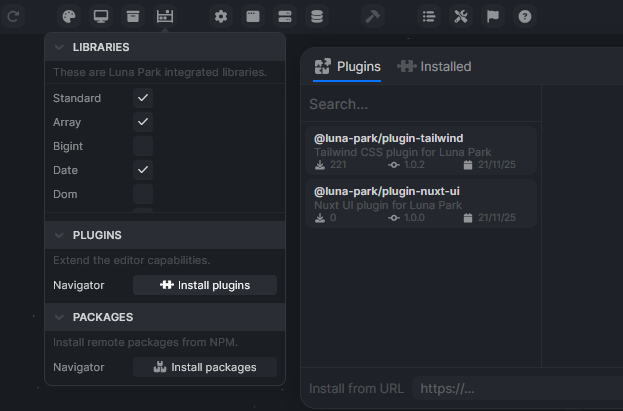
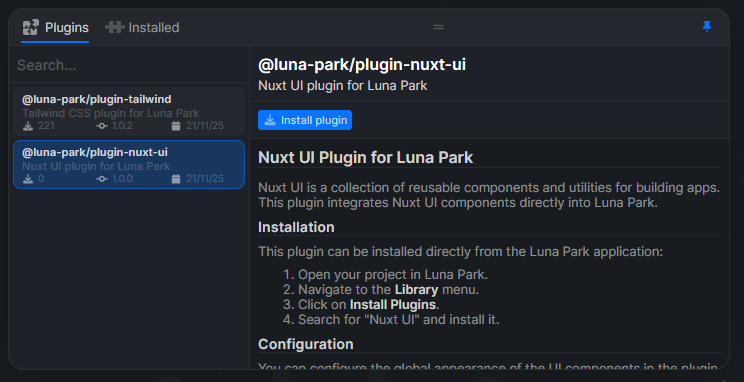
Select a plugin and click Install plugin.
Official plugins
Ferris Wheel
@luna-park/plugin-ferris-wheel
Luna Park's design system. Provides the base component library and auto-generates color variants from the palette (primary, content, etc.).
Nuxt UI
@luna-park/plugin-nuxt-ui
Integrates the Nuxt UI component collection into Luna Park: chat, dashboard, data, forms, navigation, overlays, layout. Configurable from the plugin settings (primary color, neutral color, light/dark/auto mode, global border radius).
Tailwind
@luna-park/plugin-tailwind
Enables Tailwind CSS classes inside component style properties once the plugin is installed.
Users
@luna-park/plugin-users
User account management: sign-up, sign-in, sessions, OAuth2 (Google, GitHub, etc.), and roles with permissions. Adds dedicated graph nodes (user/connect, user/disconnect, oauth/connect, roles/has-permission, roles/assert-permission, hash/hash-argon2, hash/verify-argon2) and two configuration tabs (general, OAuth2). Passwords hashed with Argon2id, users and sessions databases initialized automatically.
Build your own plugin
If you're comfortable with TypeScript (and Vue for components), you can write your own plugins. See Develop a plugin.