Plugin basics
The @luna-park/plugin package provides the tools needed to create plugins.
A plugin exports an object defined with makePlugin:
import { makePlugin } from '@luna-park/plugin';
import myIcon from './my-icon.svg';

export default makePlugin({
    id: 'my-plugin',
    name: 'My Plugin',
    icon: myIcon
});
Required properties:
id: unique identifier across all plugins.name: display name.icon: URL string or SVG string.
Configuration
The config property defines a form displayed in the plugin's settings and in the editor's top bar. Values are saved with the plugin's data.
config is a LogicType (see Typing).
makePlugin({
    /* ... */
    config: LogicType.object({
        name: LogicType.string({ default: "Marty McFly" })
    })
});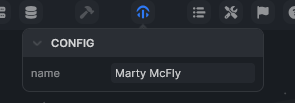
The config object is available in hooks and initialization functions (e.g. config.name).
Internal state
internal stores plugin data that is not exposed in the settings page. A default value is required.
makePlugin({
    /* ... */
    internal: {
        tutorial: true
    }
});
Available like config in hooks and initialization functions (e.g. internal.tutorial).
Option format
The options that follow (hooks, injections, windows, templates) accept either:
- a direct object,
- a function that returns the object (can be asynchronous).
When a function is used, it receives:
| Argument | Description |
|---|---|
config | the current configuration |
internal | the current internal state |
mode | build or editor depending on environment |
app | the project's application instance |
These objects can be modified during execution.
Lifecycle hooks
Mount
Called when the plugin is mounted in the editor (installation or project load).
makePlugin({
    lifecycle: {
        mount: () => { console.log("Plugin mounted!") }
    }
});
Unmount
Called when the plugin is uninstalled.
makePlugin({
    lifecycle: {
        unmount: () => { console.log("Goodbye!") }
    }
});
Update
Called on every plugin configuration update.
makePlugin({
    lifecycle: {
        update: ({ config }) => { console.log("New config:", config) }
    }
});
Injections
inject injects CSS or JavaScript into the editor:
makePlugin({
    inject: {
        css: `#app { background-color: red; }`,
        js: `alert("Hey!");`
    }
});
Each entry can be a string or a function that returns a string.
Custom windows
A plugin can display floating windows in the editor via the LPluginWindow component. Its content and behavior are controlled by URL parameters.
import { LPluginWindow } from '@luna-park/plugin';

makePlugin({
    /* ... */
    components: {
        MyWindow: LPluginWindow
    }
});
Templates
A plugin can provide templates importable into projects via the templates property:
makePlugin({
    /* ... */
    templates: [
        /* ... */
    ]
});
Templates appear in the editor's import interface.
INFO
Components and logic nodes are covered in the following pages.