Custom Logic Nodes
You can create custom logic nodes to extend Luna Park's visual scripting editor.
Function Nodes
Function nodes are designed for complex operations or asynchronous tasks (promises). They require an input execution anchor (in_exec) and are evaluated only when triggered.
Example:
ts
import { LogicType, makeLogicNode } from "@luna-park/plugin";

export const myFunctionNode = makeLogicNode({
    name: "function-node",
    inputs: {
        in_exec: LogicType.exec(),
        in_a: LogicType.number({name: "A"}),
        in_b: LogicType.number({name: "B"})
    },
    outputs: {
        out_exec: LogicType.exec(),
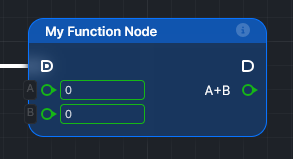
        out_result: LogicType.number({name: "A+B"})
    },
    methods: {
        async in_exec() {
            this.out_result = this.in_a + this.in_b;
            await this.out_exec();
        }
    },
    display: {
        name: "My Function Node"
    },
});
INFO
Note that every input key must start with in_, and every output key must start with out_. The default input and output execution thread anchors are in_exec and out_exec.
This node will be displayed like this:
Operation Nodes
Operation nodes are used for simple, synchronous logic operations. They do not require an input execution anchor and are evaluated on demand.
Example:
ts
import { LogicType, makeLogicNode } from "@luna-park/plugin";

export const myOperationNode = makeLogicNode({
    name: "operation-node",
    inputs: {
        in_a: LogicType.number({ name: "A" }),
        in_b: LogicType.number({ name: "B" })
    },
    outputs: {
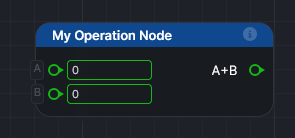
        out_result: LogicType.number({ name: "A+B" })
    },
    methods: {
        compute() {
             this.out_result = this.in_a + this.in_b;
        }
    },
    display: {
        name: "My Operation Node"
    }
});
This node will be displayed like this: