Typography
Typography in Luna Park controls how text is displayed in your application: size, weight, font, spacing, alignment...
HTML Tags
Each text element can be rendered with a different HTML tag depending on its role in the page:
div: generic block (default).p: standard paragraph.span: inline text, used to style a specific part of a text.
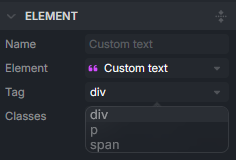
Note: Choose the tag according to the content semantics, not its appearance.
Typography Properties
Text properties are found in the Style tab. They are divided into two categories: Font and Text.
Font
These properties control the typographic base of your elements.
| Property | Description |
|---|---|
| Color | Defines the text color. |
| Family | Chooses the font used (global or custom). |
| Letter Spacing | Adjusts the spacing between letters. |
| Line Height | Defines the line height. |
| Size | Determines the text size. |
| Style | Defines the font style (normal, italic, etc.). |
| Weight | Controls the text thickness (light, regular, bold, etc.). |
Text
These properties control the layout and effects applied to the text.
| Property | Description |
|---|---|
| Align | Aligns the text (left, center, right, justified). |
| Decoration | Applies a decoration (underline, line-through, etc.). |
| Overflow | Manages text overflow (clip, ellipsis, etc.). |
| Shadow | Adds a drop shadow to the text. |
| Transform | Transforms the text (uppercase, capitalize, lowercase). |
| Wrap | Defines if the text breaks automatically or stays on a single line. |
Best Practices
It is recommended to define a consistent system, specifically:
- A regular scale of sizes, preferably using a token with
- One or two font families maximum.
- Constant rules for weight and spacing.